The AI crawler traffic that many analytics platforms miss — and how our product captures it
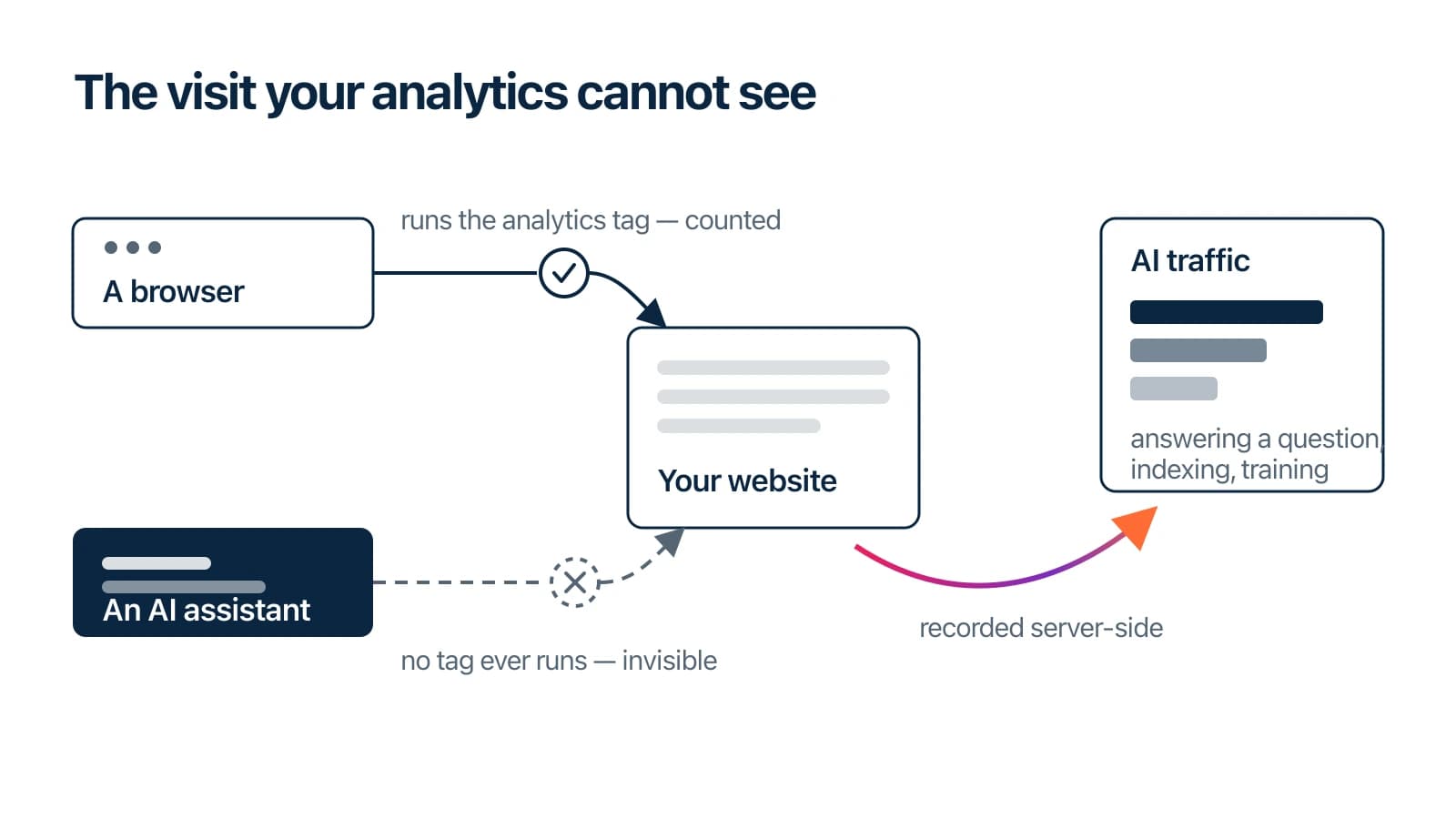
When ChatGPT, Claude, Perplexity or another AI service answers a question about your business, it may retrieve or rely on content from your website. The AI companies say so themselves: OpenAI documents its crawlers here, Anthropic lists its crawlers here, and Perplexity records its crawlers here. Every one of those fetches reaches your server. These fetches don't necessarily appear via your analytics dashboards and reports.
Last month we built a product for our partners that shows exactly these visits — which AI system fetched which page, when, and which published crawler role it came from. This article explains why the visits are invisible to many ordinary analytics platforms, what our dashboard records, how we collect the data on our own architecture, and how to get comparable visibility if your site runs on Cloudflare or Shopify.
Why some analytics platforms cannot see these visits
An analytics tag records a visit by running JavaScript in a browser, and that is where this traffic slips through — though not always for the reason people assume. Some crawlers issue a plain server-to-server request for the raw HTML and never execute a script at all; that is what we see in the fetches we record on the sites we maintain. Others genuinely do render, and are still missed — Google's own guidance is that "client-side analytics may not provide a full or accurate representation of Googlebot and WRS activity on your site", because Googlebot may not fetch reporting requests that do not contribute to page content. Either way the conclusion holds: if your measurement depends on a tag firing in a browser, there is a good chance this category of traffic is invisible to it.
The visits are still in your server logs — requests from the major vendors can often be identified by their published user agents and, where available, their verified IP ranges. A user-agent string on its own can be spoofed, which is why Cloudflare's verified-bots system checks IP lists, reverse DNS or cryptographic signatures as well as self-identification. The data is not secret. Turning those log lines into something a human can read is a step someone has to build.
Three crawler roles, and which vendors publish them
The vendors themselves distinguish why a fetch happens, and the distinction matters commercially. OpenAI is explicit that "OAI-SearchBot is for search," that GPTBot exists for training — in OpenAI's words, it "is used to make our generative AI foundation models more useful and safe" — and that ChatGPT-User fetches happen when a person asks ChatGPT something that requires reading your page. Anthropic categorizes things similarly: ClaudeBot handles training; Claude-User covers user-initiated requests; and Claude-SearchBot exists, in Anthropic's words, to "improve search result quality". Perplexity states that PerplexityBot indexes for its search results and "is not used to crawl content for AI foundation models," while Perplexity-User fetches on a user's behalf. So the roles are not evenly distributed: OpenAI and Anthropic each publish a crawler for all three, while Perplexity publishes two and states plainly that neither is used for foundation-model training.
Those are three different events for your business:
- Answering a question. Somebody put a question to an assistant, and your page was fetched to build the reply. For many businesses, of everything recorded here, this is the nearest thing to a lead.
- Indexing for search. Your page is being catalogued so an assistant can surface it later — it is how you become quotable.
- Training a model. A crawler whose published purpose includes model training requested your content. I am not at this time aware of any direct benefit for the publisher for this kind of traffic. Something for me to further investigate at a later time.
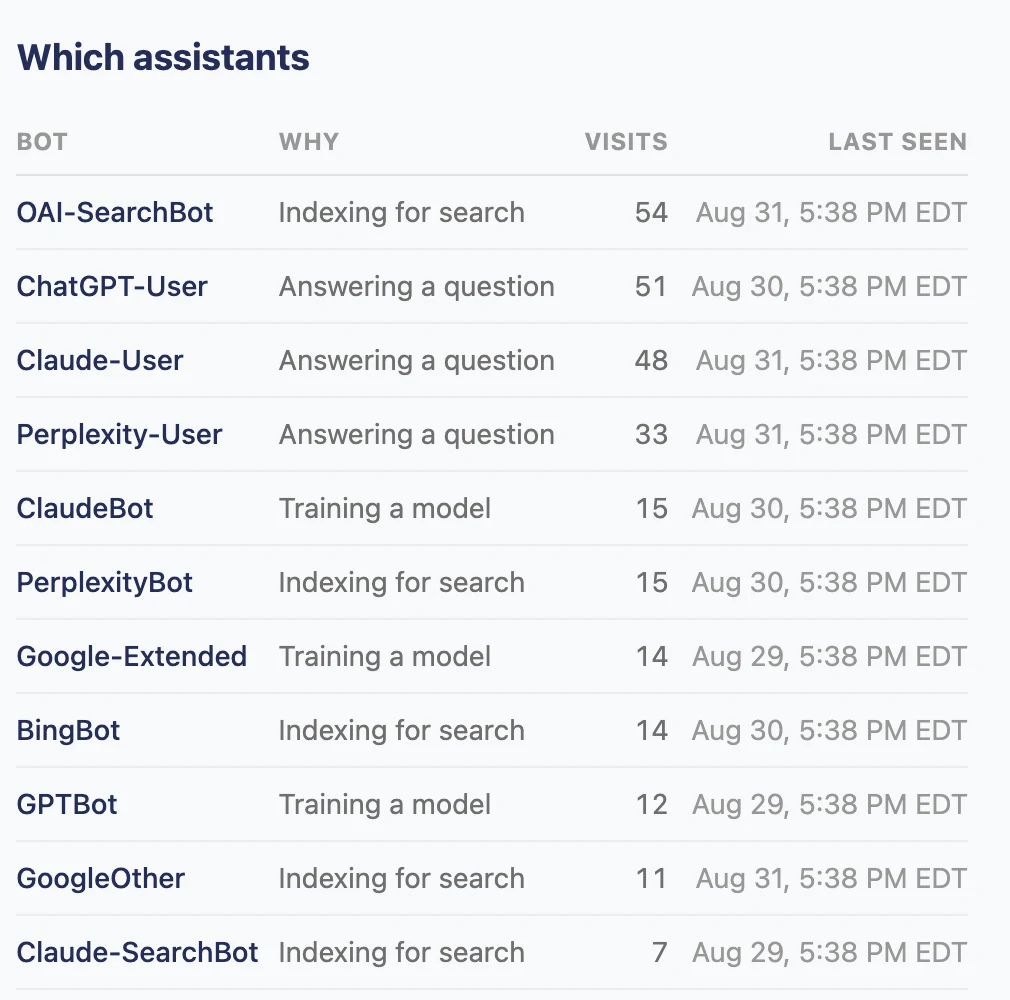 The roles are not an abstraction — each vendor's published crawler names arrive in the log and map onto them directly. Note OAI-SearchBot and ChatGPT-User separating OpenAI's indexing from its user-triggered fetches.
What the dashboard shows
Our AI traffic page groups every recorded fetch by those three published roles, using each vendor's own user agents as the classification key. One limit worth stating plainly: this classifies a request by the role its crawler is published under, not by what the result was ultimately used for. OpenAI says that where a site permits both OAI-SearchBot and GPTBot, it may use one crawl for both purposes — so a role is a reliable label for the requester, not a claim about a single exclusive downstream use. Above the log, it answers the questions people actually ask of this data:
- Totals by reason, over a selectable 7-, 30- or 90-day window.
- A by-day chart, stacked by reason, so a spike is visible and attributable to a day.
- A vendor filter — only OpenAI's fetches, only Anthropic's, and so on.
- A per-page view: enter one path and see when anything first fetched it and everything that has read it since. For a newly published page, "has any tracked AI crawler or fetcher requested this yet?" is a question with a date-stamped answer.
- Filters that live in the URL, so a filtered view is a link a person can send to a colleague.
- Honest empty states. If collection has not been set up for a site, the page says so and explains the step — it does not show four zeros and let the reader conclude nothing is happening.
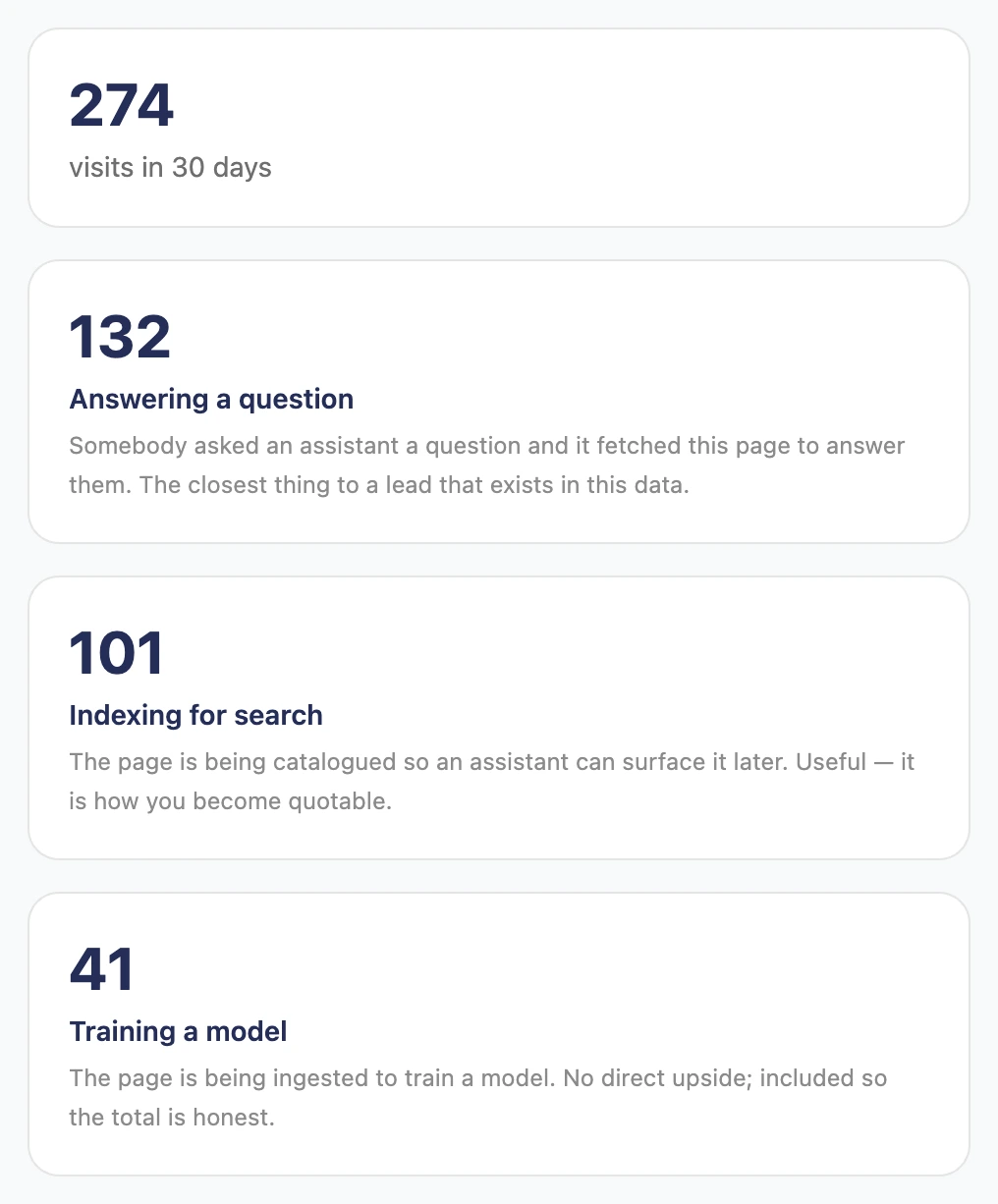 Totals for a 30-day window, split by the role of the crawler that made each request. Every screenshot here is our demo Studio — a fictional firm with synthetic data — so no client's figures appear.
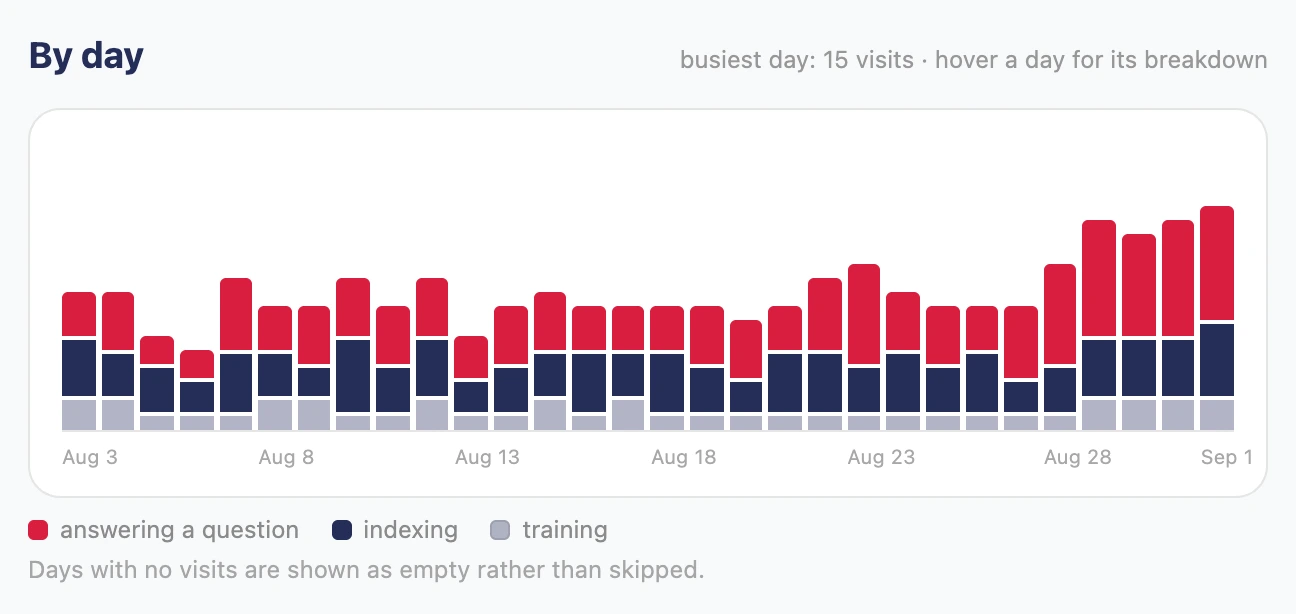 The same visits by day, stacked by role, so a spike is attributable to a date rather than lost in a monthly total.
How we collect it on our own architecture
Our platform hosts a content studio for multiple client organizations, each isolated as its own tenant. Collection works one of two ways, depending on where the client's website lives:
- Sites served through our own proxy log AI fetches directly: the server answering the request records the path and user agent as it responds, so there is nothing to install.
- Sites on their own hosting get a small pass-through worker deployed in front of the site. It forwards every request untouched, and for requests whose user agent matches a generous list of AI-vendor tokens, it reports the path and user agent to our platform's ingest endpoint — fire-and-forget, so the site is never delayed or altered, and each site authenticates with its own revocable key.
One deliberate design decision: classification happens on our platform, against a single signature list, not in the worker. The worker's filter is coarse on purpose — a token it forwards unnecessarily costs one tiny request, while a token it misses is an AI read never counted. Keeping the real classification in one place means "AI traffic" means the same thing for every site we operate, and improving the signature list improves every dashboard at once.
If your site runs on Cloudflare, start there
You do not need a custom platform to get this visibility. Cloudflare's AI Crawl Control is available on all Cloudflare plans, including the free one, and its analytics show request volumes, status codes, popular paths, and individual crawlers grouped by operator — OpenAI, Anthropic, Google, Microsoft, Meta and others — with allow and block controls per crawler. Referral metrics, which show traffic arriving from AI services rather than fetches by them, sit on the paid plans. If your site traffic is already proxied through Cloudflare, this is a settings page away, and we would recommend looking there before building anything.
We built our own because our clients' dashboards live inside our platform, scoped per tenant next to their content, search and publishing data — and because several client sites do not run through Cloudflare at all. Different architecture, same goal.
If your store runs on Shopify
Shopify gives merchants control over crawlers through the robots.txt.liquid template, documented in the Shopify Help Center — that is where allow and disallow decisions for the AI user agents above belong on a Shopify store. Control, however, is not the same as operator-level visibility: robots.txt shapes who may fetch, and tells you nothing about who did. Shopify does now offer broad visibility of its own — a Human or bot session dimension and filter in Analytics, applied to incoming data from 7 October 2025. It classifies a session as probably human or probably bot; it does not tell you which operator, so it will not separate OpenAI from Anthropic from an ordinary scraper.
One path to visibility on Shopify is putting Cloudflare in front of the store, which historically was a famously risky configuration. Tony Castillo from WISLR has written a careful account of Cloudflare's Orange-to-Orange routing and what it changed — which warnings are obsolete, which still bind, and the exact settings that keep certificate renewal working. He reports that with O2O, a proxied CNAME routes requests through your Cloudflare zone first and Shopify's second, which is precisely the position from which Cloudflare's AI crawler analytics can observe a Shopify storefront. I have worked with Tony a few times before, and I can't say enough good things about his technical skills and SEO / AEO / GEO-related expertise. He is a remarkably talented writer, and a total pleasure to work with. Cloudflare documents the Shopify O2O path themselves and states that it can be enabled on any Cloudflare zone plan; their provider guide is the official companion to Tony's write-up. If you are weighing that setup, read both before touching DNS.
What this data can and cannot tell you
It can tell you which tracked AI systems requested your pages, what they requested, when the requests began, and — for user-triggered fetchers specifically — which pages were requested in connection with someone's question — first-hand, from your own infrastructure, with no sampling and no third-party attribution model in the way.
It cannot tell you that you will be cited, ranked, or recommended. Google's own guidance on generative AI features says "optimizing for generative AI search is optimizing for the search experience, and thus still SEO," and that "Structured data isn't required for generative AI search." We take the same line about measurement: a fetch is evidence of attention, not a promise of a citation. What the dashboard changes is that decisions about AI visibility start from recorded visits instead of from guesses.
Questions we get
Why doesn't Google Analytics show visits from ChatGPT or Claude? Because analytics tags run as JavaScript in a browser. Some AI crawlers never execute scripts at all; others do render pages but may not fetch the reporting requests a tag depends on — Google says as much about Googlebot and its rendering service. Either way the requests are in your server logs, and a browser tag may never record them.
What is the difference between GPTBot and ChatGPT-User? GPTBot is OpenAI's training crawler, and ChatGPT-User is the fetcher that reads a page because a person asked ChatGPT a question requiring it — OpenAI documents both, along with OAI-SearchBot for search indexing. Blocking one does not block the others.
Should I block AI crawlers? That is a per-purpose decision, and the vendor documentation is built for making it: OpenAI and Anthropic each publish distinct user agents for training, search and user-initiated fetches, so a robots.txt file can, for example, disallow training crawlers while leaving search indexing and user fetches open. Perplexity is the exception worth knowing: it publishes a search crawler and a user fetcher, and states that neither is used to crawl content for foundation models. One caveat from Perplexity's own documentation: its user-initiated fetcher "generally ignores robots.txt rules," on the reasoning that a person, not a bot, asked for the page.
Does being fetched mean being cited? No. A fetch means a tracked crawler or fetcher requested the page; whether the page is quoted, cited or recommended is decided elsewhere, and no vendor documents a guarantee. Treat fetch data as an indicator worth paying attention to.
Ask us for an AI traffic readout
Want to know what is reading your site? Let us know. We can review your hosting architecture, set up first-party AI traffic collection appropriate to it — Cloudflare's tools where they fit, our collection layer where they do not — and share a concise readout of which AI systems are reading your pages, what they read most, and what that suggests about how assistants currently see your business.
Thank you for your time
If you have any questions or want to connect on anything that I wrote about above, please email me or book some time on my calendar. Any and all feedback is of course so appreciated.